SD Cards - What Type, Capacity and Speed Do I Want?
If you use a camera, phone or mp3 player that takes SD memory cards, you'll probably find this web site useful. The storage form is evolving, and there are more types of cards available all the time. Here's where you can sort it all out:
SD, SDHC, SDXC and SDUC Card Capacity Choices
Match the Logo to your device
Before inserting your SD memory card, confirm the device is compatible with the SD standard by locating an SD logo and other symbols on the device or referring to the device’s user manual or manufacturer information. Interoperability of host devices and cards are shown below.
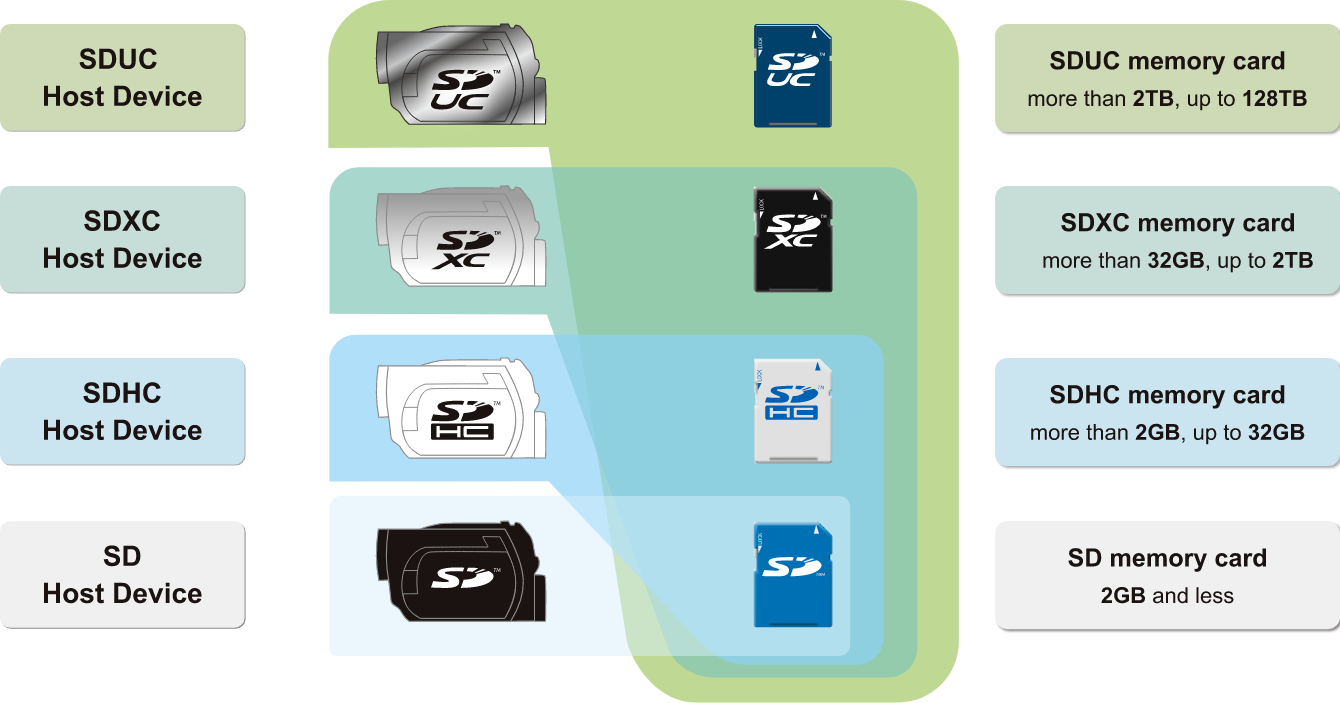
-SDUC memory cards must only be used with SDUC Host Devices.
-SDXC memory cards can be used with SDXC devices and SDUC Host Devices.
-SDHC memory cards can be used with SDHC devices, SDXC devices and SDUC Host Devices.
-SD memory cards can be used with SD devices, SDHC devices, SDXC devices and SDUC Host Devices.
-SDUC Host Devices can use SD memory cards, SDHC memory cards, SDXC memory cards and SDUC memory cards.
-SDXC Host Devices can use SD memory cards, SDHC memory cards and SDXC memory cards.
-SDHC Host Devices can use both SD memory cards and SDHC memory cards.
-SD Host Devices can only use SD memory cards.
The SD Memory Card Formatter was created specifically for memory cards using the SD/SDHC/SDXC standards.
It is strongly recommended to use the SD Memory Card Formatter instead of formatting utilities provided with operating systems that format various types of storage media. Using generic formatting utilities may result in less than optimal performance for your memory cards.
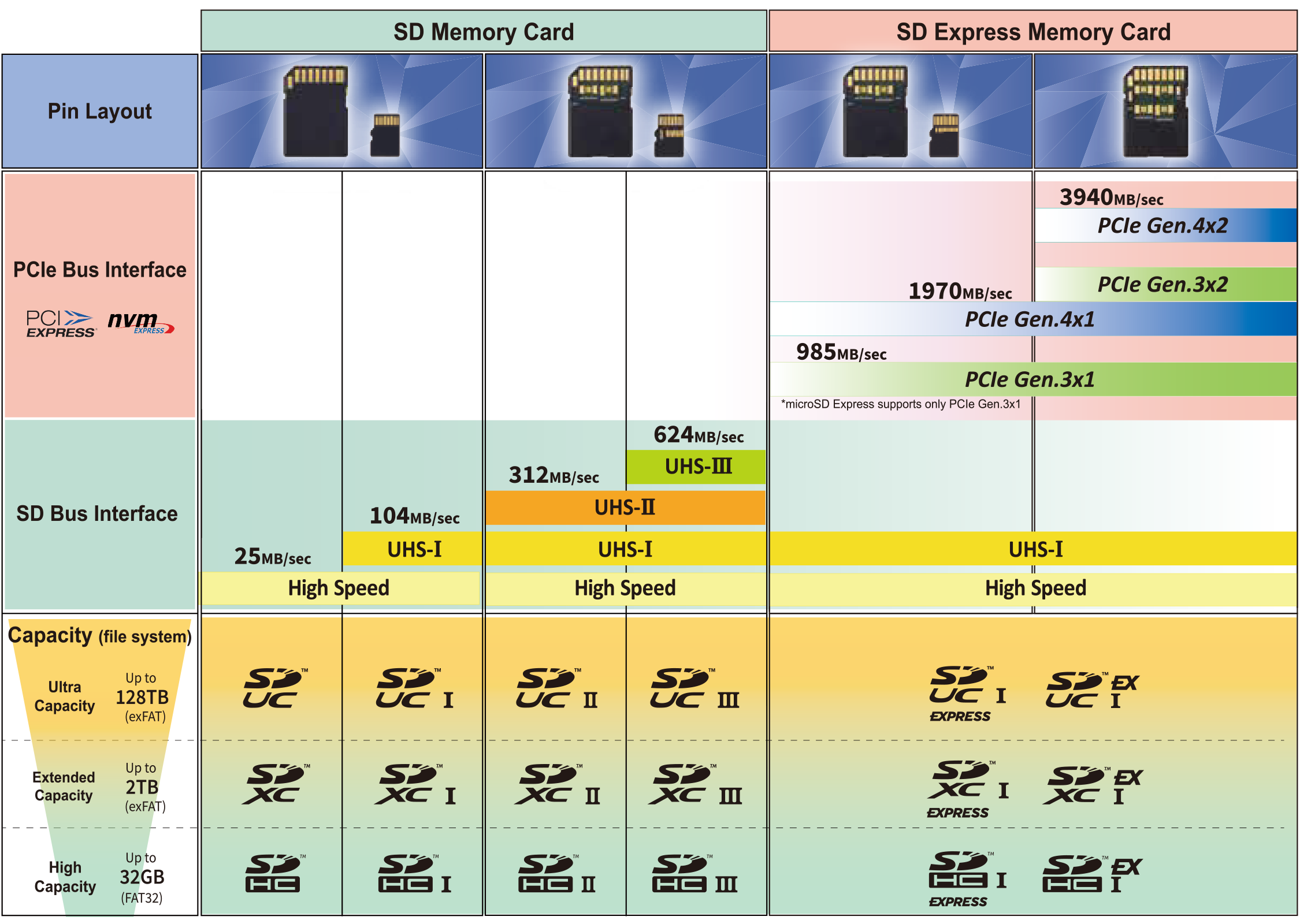
Any high speed cards can be used in UHS-I, UHS-II, UHS-III and SD Express host devices. Faster performance levels will only be attained when matching the card to the host device.
Therefore, devices supporting UHS-I perform the best with UHS-I memory cards. UHS-II devices also perform the best with UHS-II memory cards and UHS-III is the same. SD Express devices will perform best when using SD Express cards as well.
Speed Class Standards for Video Recording
SD Speed Class/UHS Speed Class/Video Speed Class
Greater Performance Choices
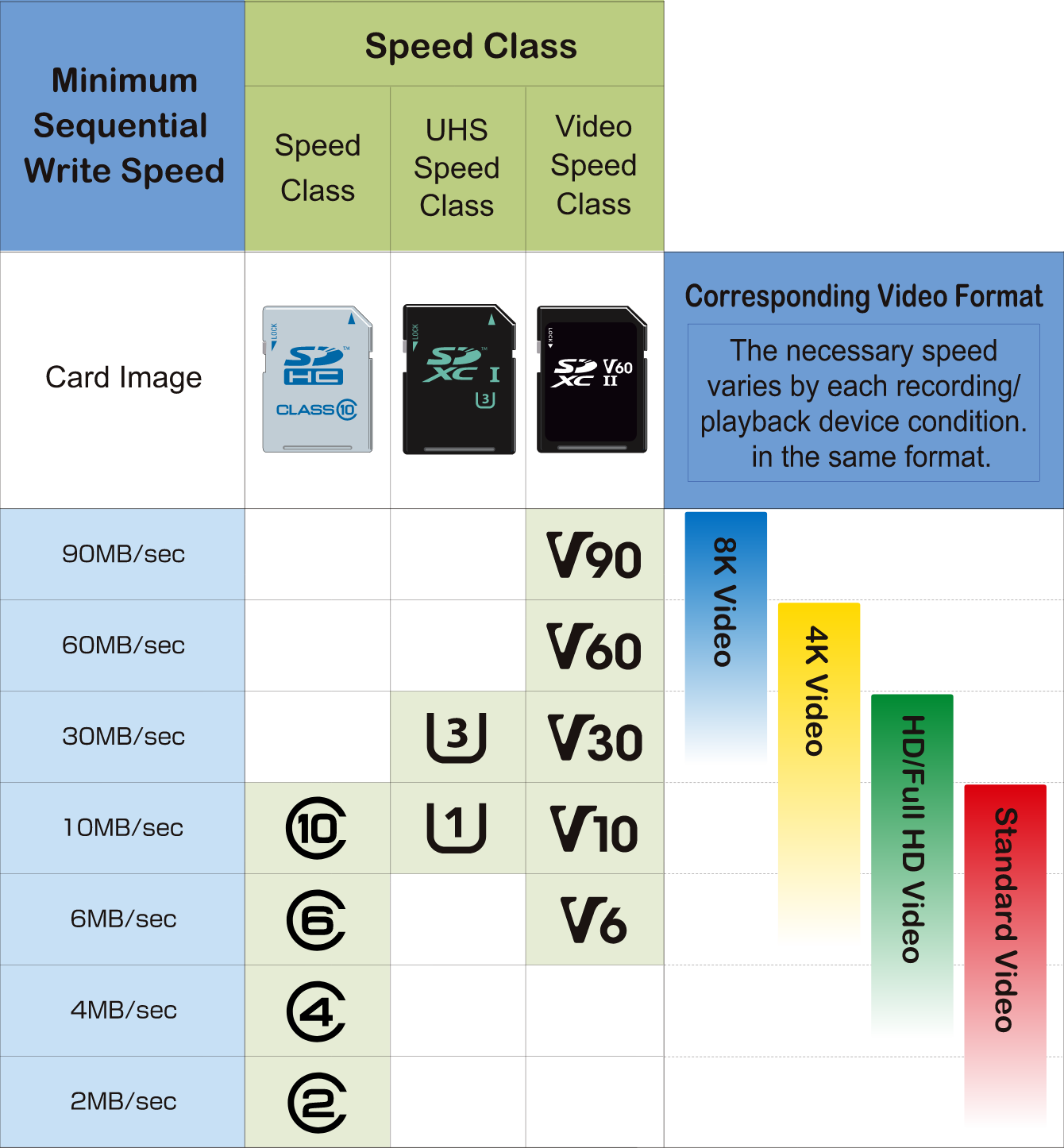
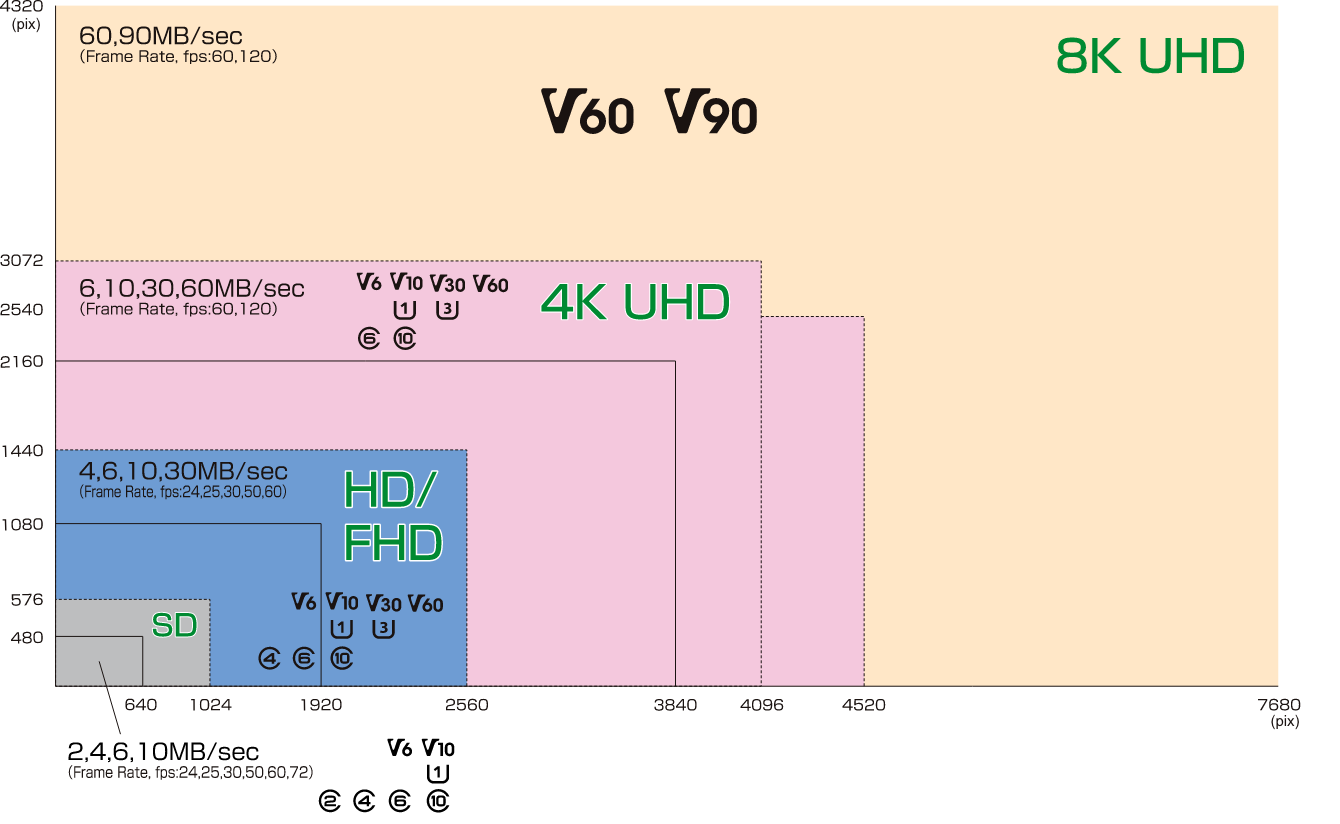
There are three kinds of Speed Classes, “Speed Class”, “UHS Speed Class” and “Video Speed Class.”
As a characteristic of flash memory, actual transfer speed varies. Variable speeds are difficult to reliably record streaming content such as video because it requires a constant writing speed. All Speed Classes provide the constant speed necessary for video recording by designating a minimum writing performance so that minimum and constant speed could be achieved for camcorders, video recorders and other devices with video recording capabilities under the conditional write operation specified in the standard.
| SD Standard | SDHC Standard | SDXC Standard | SDUC Standard | ||
| Capacity | up to 2GB | more than 2GB up to 32GB | more than 32GB up to 2TB | more than 2TB up to 128TB | |
| File System | FAT 12, 16 | FAT 32 | exFAT | exFAT | |
| SD Logo |  |  |  |  | |
| Form Factor Size | SD | 32 x 24 x 2.1 mm | |||
| microSD | 11 x 15 x 1.0 mm | ||||
Speed Classes | Normal Speed mode | C2, C4, C6 | |||
| High Speed mode | C2, C4, C6, C10, V6, V10 | ||||
| UHS-I mode | — | C2, C4, C6, C10 U1, U3 V6, V10, V30 | |||
| UHS-II mode | — | C4, C6, C10 U1, U3 V6, V10, V30, V60, V90 | |||
| UHS-III mode | — | C4, C6, C10 U1, U3 V6, V10, V30, V60, V90 | |||
SD Speed Class
Video Format
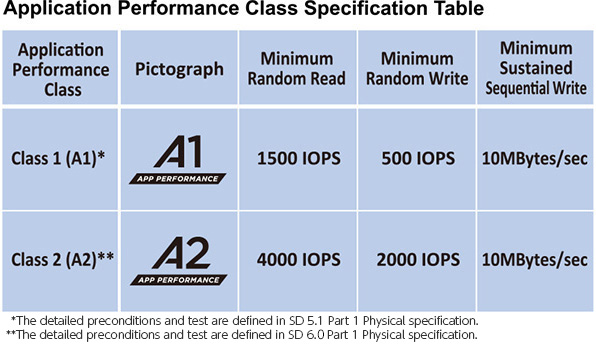
With the expanded usage of SD memory cards for storing applications and application data, there is a growing need for a combination of random and sequential performance levels. This demand becomes even stronger with the introduction of Android’s Adopted Storage Device capability.
The App Performance Classes assure minimum random and sequential performance speeds to meet both run and store execution time requirements under given conditions, while still providing storage of pictures, videos, music, documents and other data.
This table describes the Application Performance Class 1 (A1) and Class 2 (A2) specification and the minimum random read performance inputs/outputs per second (IOPS), minimum random write performance(IOPS) and the minimum sustained sequential performance (MB/s) of the corresponding SDHC/SDXC Memory Cards under the conditions defined in SD 5.1/SD 6.0 Part 1 Physical specification.
Low Voltage Signaling
Low Voltage Signaling 
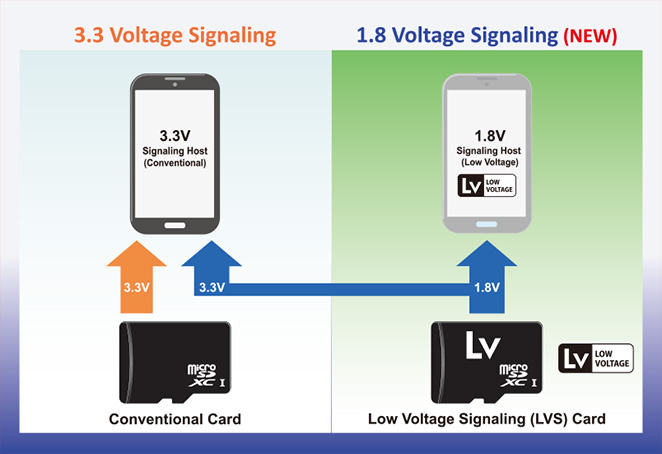
SD Specification 6.0 introduces the Low Voltage Signaling (LVS) memory card that may support either 3.3V or 1.8V signaling with an auto detection mechanism of the host’s operating signaling level. It coincides with new SOC designs while keeping full backwards compatibility to legacy 3.3V signaling hosts. The new specification now lets LVS host devices start in UHS-I 1.8V mode directly after power up on the LVS card.
An LV symbol identifies LV Interface supported SD products for users. An LVS host will bear the LV symbol somewhere on the product, package or manual. LVS device users need to use a corresponding SD memory card with an LV symbol for their LV-marked device. On the other hand, an LVS card is usable by any host, including hosts that do not carry the LV symbol.
The #choosemicroSD Movement
Ever run out of storage on your personal device?
Asking just one question will ensure you get the smartest device possible: Does this device have a microSD memory card slot?
microSD memory cards offer more storage space to secure your photos, videos, music and work in the most economical, efficient and environmentally friendly way possible. Get the most out of every device you own by making sure it has a microSD memory card slot so you can upgrade your storage when you want.
There are thousands of amazing smartphones, tablets, cameras, video cameras and action cameras using microSD memory cards to help you get the most for your money. Many of the companies whose products support microSD memory cards are members of the SD Association.
Get the maximum memory, flexibility and efficiency when you #choosemicroSD!
Video Playlist:
No, I don't write this stuff. I share what I find when I stumble across it and wish I had found it sooner!


Comments
Post a Comment